• HOME
  • SHOP
    • SHOP ITEMS
    • CART
    • CHECKOUT
  • PORTFOLIO
    • GALLERY
    • SLIDE SHOW
    • PROJECTS
  • BLOG
  • TOTAL BLAST
  • ABOUT
    • PROFILE
    • BACKSTORY
    • WORKFLOW
    • NEWS LETTER
  • HIRE ME
  • CONTACT
Art, designs, illustrations, text and content © 2025 BenKrefta.Com

Art Portfolio Video

by Ben September 23, 2015 in Art, Art Talk 0 comments tags: art, art portfolio, artwork, YouTube

Here's a little walk-through of me discussing the artwork currently on my website, as of 2015/2016. I'll no doubt update the gallery with newer pieces over the years and take down older artworks. It'll be interesting to see which pieces stay and which get removed over time.


Leave a Reply

I made my own T-shirt

by Ben August 04, 2015 in Art, Art Talk, Personal 0 comments tags: art, design, review, tshirt

Designing something a bit different

Most designs you find at local retailers are boring, ordinary, common or look cheap and tacky- especially this recent craze for rectangle prints on the fronts of t-shirts which look like an uninspiring ink-jet transfer paper job. A design on shirts, any other clothing, or even tattoos on skin need to be placed properly. A top-heavy shirt with a design covering just the shoulders and chest or an a-symmetric piece of artwork can look great, but most companies just churn out the same, basic, small to medium sized square or round design slapped in the centre with no consideration to flow, composition or just trying to do something a bit different.

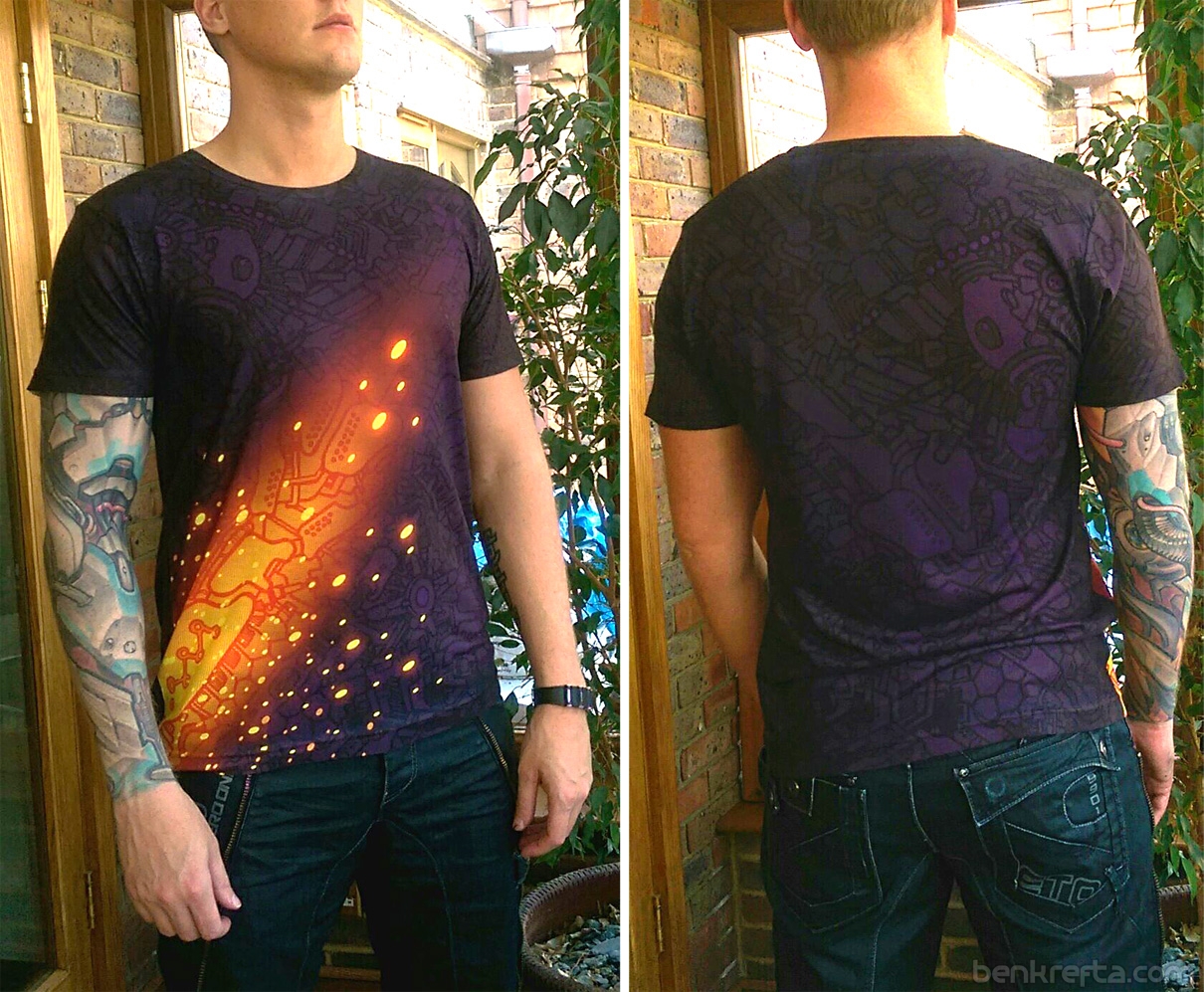
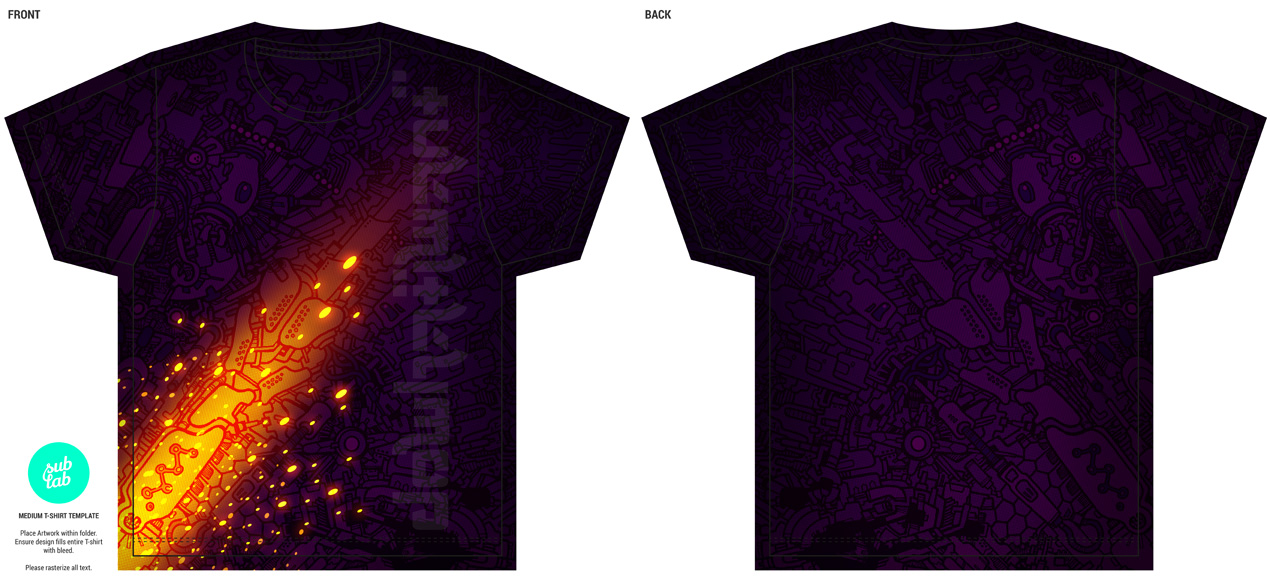
Tshirt doodle design1Recently I designed a full-print shirt with one of my doodle-mech designs after stumbling upon a UK company who can process full-coverage 'dye sublimation' shirts at small quantities. Check out www.sublab.co.uk for more info. I designed the shirt to fit the provided template, then sent it back as a PSD Photoshop file. Wanted a dark purple tee with contrasting orange for a while, so here's my opportunity to get one :)


All-Over Shirt printing

There was no mention of shirt dimensions other than chest size on site at the time, so did a little research for "American apparel t-shirt" to get a fairly good idea of the size I'd need. Being 6'1" male, with a 40" chest and 35" waist, I went for a medium and it fit pretty well. Some sizes hinted at a large being more appropriate for me. Although I prefer a slightly tighter fit, so wonder if a 'small' (described as a 34-36" chest size) would have looked better on my frame? I wondered if it would be possible to find and supply your own shirts for printing to guarantee a better fit? If spending over £30 for a t-shirt, you'd hope for it to fit well as well as look good.

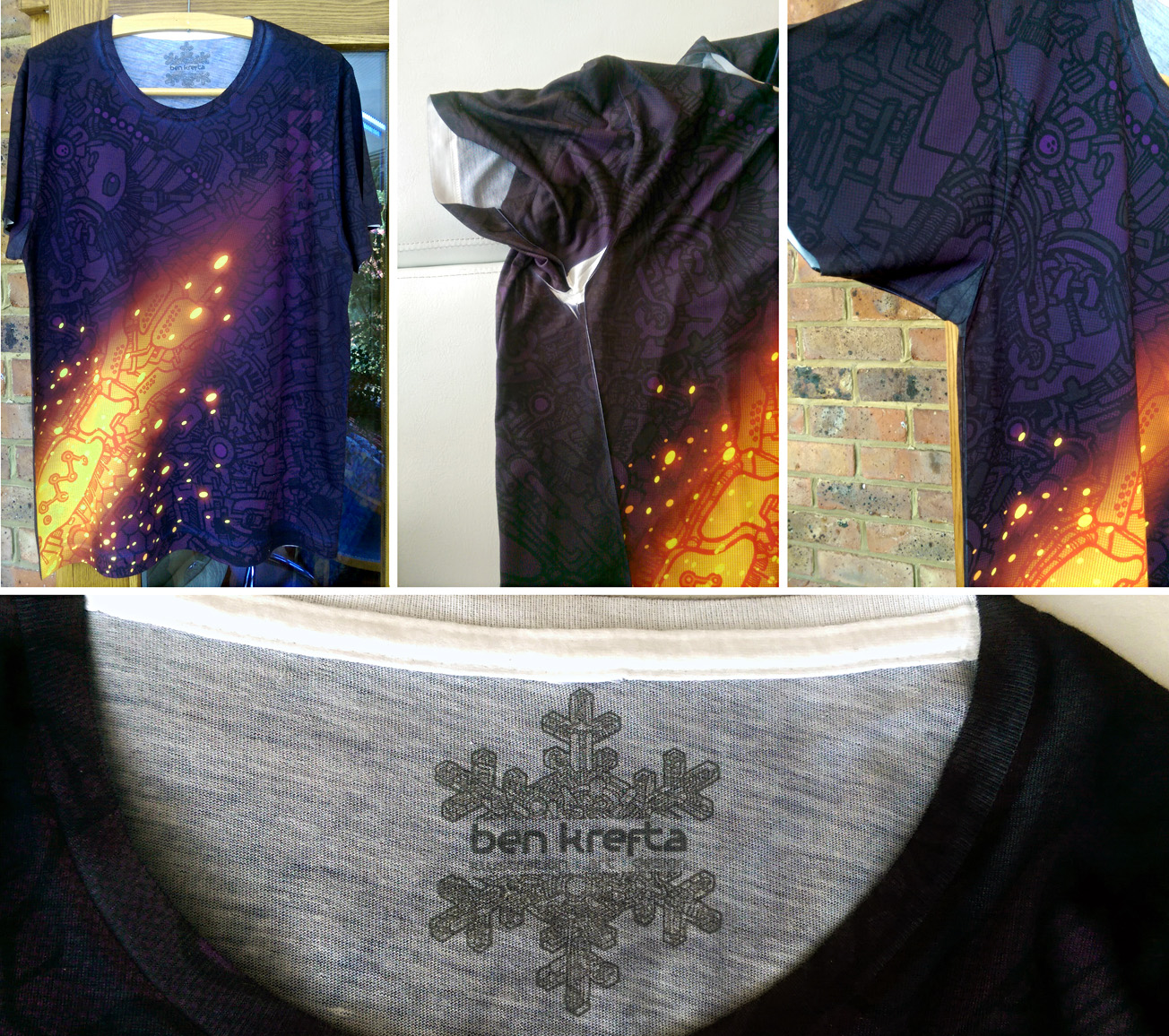
The design came out very nicely with colours nearly as vibrant as my RGB computer screen. Tonal contrast was lacking a touch in certain areas, which is worth taking into consideration when designing my next shirt. There wasn't enough contrast with the subtle greys on the inside neck logo, so would also look to make that darker for next time. Very fine lines don't show up so well- keeping things a little bigger and bolder is the way to go.

The biggest problem was the inevitable white creases around the seams and armpit areas. Patches, nooks and crannies where the print doesn't reach. I knew there would be a strong possibility of this happening and they looked pretty bad if the arms were raised. I manually filled these areas with a black Sharpie, which over time fades out to a grey tone. Took some effort but now looks A LOT better than it did upon arrival, and probably not noticeable unless pointed out. I'm hoping it'll hold up in the wash. I may need to try other permanent ink or fabric markers if not.


The Result

I like the idea of selling full front and back print shirt designs, but with my mark-up on top, I'm not sure people would be willing to pay £40-£50 for a single t-shirt? It may not be everyone's cup of tea, so for now I'll continue to create my own custom shirts from time to time for personal use and leave it at that. Many thanks to Sublab for providing the opportunity to try this. The shirt looks awesome!

Tshirt doodle photo2

Tshirt doodle photo1

Apologies for the poor photo quality of on my phone, but you get the idea :)

Leave a Reply

Why Freelancer.com sucks

by Ben May 22, 2015 in Art Talk 8 comments tags: freelancing

Freelancerlogo

As a freelancer:

I joined up to Freelancer.com a number of years ago- my first experience with crowd sourcing- which is basically a case of assigning work you need done to a crowd of potential bidders on the internet.

It sounded like a great idea- there's lots of work to go around from potential employers and providing you can put forward a good case for each project, there didn't seem much reason not to be provided a regular stream of work.

However, there's a few issues I wanted to highlight after having used the site several times.


1. Getting work is difficult!

When bidding on a project you start at the bottom of the rankings list. That's until you complete more jobs, earn more money and receive positive reviews through the site itself. You may have had decades of experience off-site, but that fact is irrelevant to how you're ranked on the freelancer.com bidding list. Competing against the regular freelancers on the site will therefore be challenging- they will have already completed work specifically through the site and boosted their rank, despite not necessarily being the most talented, hard working, professional or suitable candidate on the list. To compete you'll need to build your site rank and to do this to start getting better paid jobs and until then, you'll have to under-sell your services to stand out and have a chance of being selected to work on any given project which may already have a several, if not dozens of bidders already.


2. Reviews can be bullshit

I entered a graphic design competition on the site, won it out 20 or so other entries. Great! Especially considering I'm a much stronger illustrator than I am graphic designer. However, being given a 2 star review from it wasn't so great! Why did this happen? I was marked down in my review for things like 'lack of communication' despite the fact there was never an opportunity to communicate - the competition format simply allowed submission of entries and then a winner was chosen. As a person who takes his level of service and professionalism seriously, I'll always aim for nothing less than a 5 star rating and will go the extra mile with my clients to make sure their expectations are always met if not exceeded. It's pretty annoying that my account is now stuck with this unfair, unjustified poor review and it gives a completely wrong impression of my work ethic, lowering my chances of getting hired for future projects.

If my art or design ability wasn't up to an employers standards, I'd be more than happy for them to award a different winner, or in this case I'd rather just give them the work for free than receive a poor review... Yeah, it pissed me off.

Reviews count for a lot on Freelancer since they contribute to your ranking as a professional, but they don't always indicate a freelancer's actual knowledge, ability, experience or professionalism.


3. Can't compete with the rest of the world

I don't live in a developing country. I need to earn enough and charge an adequate fee to an employer to be able to pay the cost of living in the UK. Most freelancers are from countries such as India and Bangladesh where the cost of living is less and so are able to complete a project for 10-50% the cost of out-sourcing to a UK freelancer. If you want to earn a fair amount for your time and pay your bills with the money you earn through Freelancer, forget about it!


As an Employer:

I've also used the site as an employer to find assistants to help with parts of a project I couldn't quite finish myself. When it works, it's great- you get exactly what you want for a very reasonable price.  When it doesn't work out however it can become a very stressful experience.


1. The standard of freelancers vary

Communication is an issue- since most are from non-English speaking countries. Be prepared to deal with broken English and a degree of rudeness and unprofessionalism from many freelancers on the site.


2. Lots of Time Wasters

I've so far awarded seven projects to bidders, but only two ended up starting and completing the work. The others would either ignore messages or make endless excuses, stating they'll start it tomorrow and tomorrow never comes. This wastes days or weeks dealing with freelancers who have no intention of working.


3. Piss takers

Right now I am listing a 'micro project' to edit a few lines of code on a web page. I've listed my budget of £10-£20. It's 1-4 hours work max. Yet some freelancers will ask for hundreds of pounds. One guy is currently asking for £2600 for the job! Obviously they can charge whatever they like, but surely a lot of freelancers don't even read the briefs of the jobs they bid on.


Freelancer.com acts as the middle man between Freelancer and Employer and is always looking to leach as much money off everyone as they can. Making Paypal deposits incurs a fee. Awarding a project incurs a fee, accepting a project incurs a fee, resolving disputes incurs a fee, deleting a project incurs a fee and that's before dealing with the many up-sell or boosting services the site constantly pushes for. They'll even steal your earnings or deposits if you don't log into your account on a regular basis!

So I'm currently listing my last micro project on Freelancer and hopefully once it's finish, I'll never have to waste my time with the site again.

Leave a Reply

Yep

by Ben August 07, 2014 in Art Talk 0 comments tags: art, meme

artistjoke

Leave a Reply

Publishing an instructional book

by Ben August 01, 2014 in Art Talk 0 comments tags: book, digital manga, freelancing

Digital Manga Cover[amazon asin=1784040460&template=add to cart]


Ever wanted to publish a guide book?

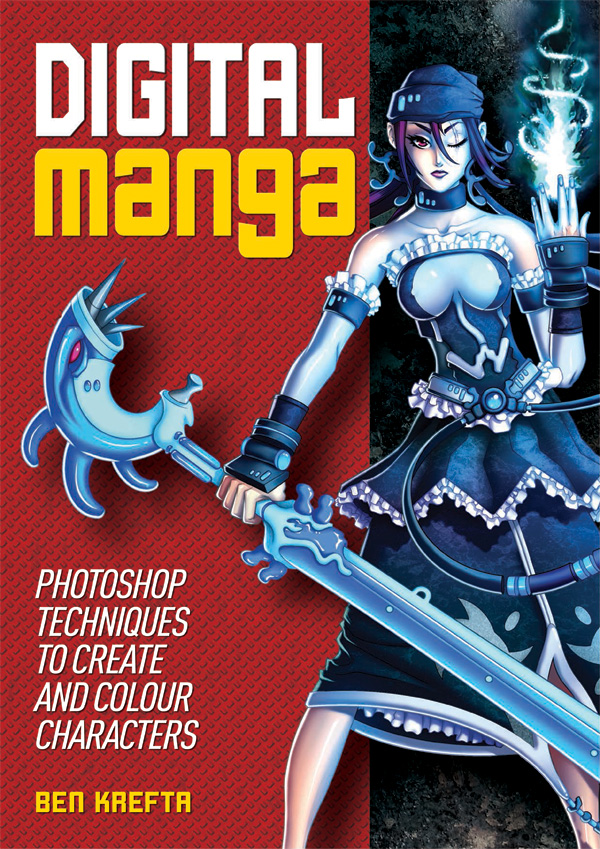
Here's a a short overview how I created Digital Manga- A step-by-step guide, teaching more or less everything I know about Photoshop and turning an initial drawing into a full rendered work of art. Perhaps you'll find it useful, or interesting to learn what was involved?


The project

People have often been impressed with my digital colouring. And so I've wanted to create a book on how I colour my character art since my last year at Uni, back in 2007. Finally in 2013 I put together a proposal and asked the Publisher of my previous titles if they'd be interested in the project. It got the go ahead!

Originally, I wanted full control of the project, even down to creating the layouts. Although I was asked to alter my initial idea somewhat to make it work for the publishers. But I was so keen to see it out there that I was happy to compromise. We dropped a section or two and added in something else and I needed to collaborate with an in-house graphic designer who took the lead on layouts.

In 2014 the book was finished and Published. I was happy!


Time

It took a while to complete- the initial given deadline was around 4 months to submit both the text and images. I then needed a number of weeks some time later to revise the page layouts and re-check over the edited text.

Initial planning took a few weeks prior. I had already created a 30 page BLAD (book layout and design proposal) years ago, which helped speed the initial planning stages up, and of course aided in pitching the idea to the publisher.

Fortunately, I also already had several finished character artworks I'd go on to contribute to the book. Each of which would have otherwise taken a good 20 hours to complete.

I worked my own hours. Some days spending 15 hours solidly working. Other days, just 4 or 5 hours. With 160 pages to fill up with well written, fresh content, it was never going to be a breeze. If I were to guess, all in, I must have spent well over 500 hours on the project.


Effort

I wanted the book to be one of the best things I'd ever produced! I was willing to go above and beyond to bring it up to my standards, even if the publisher was otherwise content with a product that was passable. Unlike my previous book TAODM, Digital Manga needed about 55% more written content and 50% more image content. Unlike the previous book, I also didn't want to use a writing assistant or several image contributions from collaborators this time around. It was important that the work would be my own. Other than a a couple of pages at the back offering tips from fellow artists I happen to follow.

I also took it upon myself to record / screen capture several of the book's character tutorials. These were converted into time lapse videos and upload to a web page I'd created along with downloadable content.


Positives

The book had been available for years now. I appreciate it may not be everyone's cup of tea, or it may not be the best instructional book in the world, but I'm really proud of the end result. After having researched hundreds of online art tutorials, forums and videos over the last decade , I know the book is covering all the necessary bases and more. It draws upon everything I've learned about Photoshop art creation since I started using it back in 2000. Years later, the book's content is still relevant even with modern versions of Photoshop having been released.

Like with many books sold, I realise a lot of readers will simply just buy it for the pretty pictures and with the intention of one day making use of it. But I really hope people out there get the chance to read it fully or practice some of the content I've provided. I'd love to know readers have learned something interesting, useful, and for the book to help with their digital art endeavours.


Problems

The book isn't as perfect as I'd like it to be. Frustratingly, I found several small errors still left in the book after having gone to print! (Mostly not my fault). These could have been easily resolved, but unfortunately, I was not given the opportunity to check out a final proof. I imagine the publishing team were up against deadlines or problems of their own and not as invested in the project? I did all that I could to make sure many of these errors were rectified when to book was reprinted in my expanded Art Class: Manga Art title.

I remember having to spend a lot of time adjusting the graphic designer's layouts or advising upon how each page was presented. There were an unacceptable amount of inconsistencies and some cases, horrendous design choices- use of garish, clashing colours, tacky background images. I hate to think how the book would have ended up had I not insisted on overseeing the layout stages. It was frustrating that the publisher insisted on using their own graphic designer for layout when I knew I could have done a much better job.

I suspected sales wouldn't reach the same levels as my previous titles. While the book is, in my opinion, totally awesome and a huge step up from the last ones, I realize Photoshop isn't as accessible to manga fans as a pencil and paper. Or indeed cheaper and free art software which many beginners use. While the book is accessible, some of the content is more advances and not something for complete novices. The book teaches how I work, but this may not be to everyone's taste.


Dealing with Publishers

Communication was done completely over email. It was great to have a record of everything sent and received and suited my late working hours.

Although there is this detachment whereby I don't know exactly what is going on their end. Like me, are they also frantically trying to get everything done and staying up until the early hours to do so? Or are they not taking the project as seriously, slapping together a half-baked job and calling it a day? If often felt like the latter. It can be easy to fear the worst if there is a lack of face to face communication or if there's a problem and I can't talk to the designer, the sales team, the accountants directly. Instead everything is going through the editor as a middle-man.


What's Next?

Another tutorial book perhaps? I was asked to work on something else which has the same of visual impact as Digital Manga. At the time of writing, nothing has been confirmed yet. I've already given my all to this book. It's hard to know how I can top it. For now I'll continue to build up a new portfolio and give myself a back-catalogue of fresh, full coloured artwork to use in a new title.

Until then, I'm looking forward to producing some more artwork and moving onto the next stage of my career :)

Leave a Reply

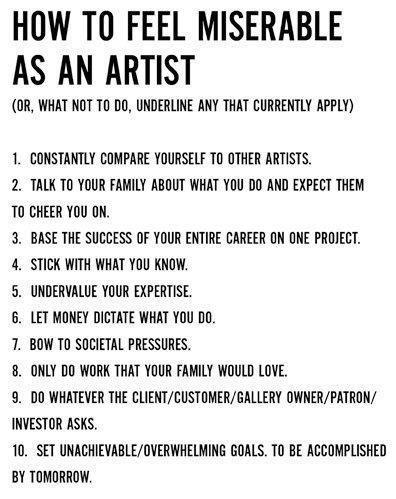
How to Feel Miserable as an Artist

by Ben July 28, 2014 in Art Talk 0 comments tags: art

artistwoes

Leave a Reply

Bad Clients entering the Art and Design Industry

by Ben July 22, 2014 in Art Talk 0 comments tags: art, freelancing

A C+P from chrisoatley.com. Thought it was worth a repost on the blog...


What Do Bad Clients Look Like?


Many years ago, I was offered what sounded like a nice freelance gig.

An oil painting. A huge portrait of a couple that would be given to them as a gift.

The painting would have taken me about two weeks.

I quoted my hourly rate which was around $35/hr at the time.

2 weeks (80 hours)  x  $35/hr = $2800

If you ask me, for a huge double-portrait in fracking oil paint, 28-hundy is a legitimate steal.

But the man offering the job did not agree. In fact, he was shocked and offended. He had a much lower figure in mind…

He the offered me $25 for the portrait.

I asked him how much he got paid for his job and if it was higher than $12.50 a week.

…and that’s the end of that story.

Granted, the “$25 Portrait” example, although true, is ridiculous. No sane artist would accept that guy’s offer.

My point here is that bad clients usually look bad right from the beginning.

It’s desperation that blinds us.

It is our desperation that gives power to the bad clients.


I'd say this example represents 90+% of the job offers I've had while freelancing. Perhaps not to this extent, but similar. With the huge pool of internet artists for both companies and private individuals to choose from these days, generating the kinda money an artist deserves is no easy task.

Leave a Reply

What is Anime and What is Manga?

by Ben July 15, 2014 in Art Talk 0 comments tags: anime, manga

anime manga ddifferences


I've worked as a manga inspired/influenced/style artist for years. Although a large percentage of people I meet don't really know what manga is! Let alone understanding the differences between it an anime. Older relatives, or those completely removed from popular culture often need educating. For most people who are unfamiliar, I'll usually just say I draw "Japanese style comics and cartoons". However, I don't think the answer to "What is manga?" or "What is anime?" is a simple 'one description fits all scenarios' sentence. With a little help from Wikipedia I thought I'd try my best at summing it up these definitions.


What is the difference between Anime and Manga?

Anime is a term to describe animation created in Japan. In the west, the term is “anime” is defined as a style and genre of animation typically originating in Japan, and can often feature detailed, colourful imagery, unique, in-depth characters and action orientated plot lines either set in the past, present, future or often within a fantasy setting. The meaning of the term ‘anime’ can sometimes vary depending on the context it’s used in.

Manga is a term to describe comics created in Japan, or produced by Japanese Manga Ka (artists), primarily for a Japanese audience. The style was developed in Japan though the mid to late 19th century with heavy influences from western and American comics combined with the long and complex history of Japanese art and wood-block prints. In the western world, the term is often defined as a style of drawing originating in Japan and many western artists have adopted this style and refer to themselves as Manga artists.

We could summarize, that typically:

Anime = animation in a typical Japanese cartoon style. Often in full Colour.
Manga = comics in a typical Japanese cartoon style. Often in black & white and with grey tones.


How would you describe anime and manga to the uninformed?

Leave a Reply

Amazon Affiliate

by Ben July 08, 2014 in Art Talk 0 comments

I decided to join up to Amazon Affiliates today. If you want to purchase my books, or indeed [amazon text=any other book through Amazon&template=Search], be sure to do it via clicking on these referral links below. Many thanks for your support :)

[amazon asin=1784046442&template=iframe image][amazon asin=1784040460&template=iframe image] [amazon asin=1841931713&template=iframe image] [amazon asin=1848588631&template=iframe image][amazon asin=1788283007&template=iframe image]


Leave a Reply

New Set up and Wacom Cintiq 22HD Review

by Ben July 06, 2014 in Art Talk 6 comments tags: art, review

I just want to give a quick overview / review of my work area. Nothing too in-depth, but hope it's useful to get a gist of another digital artist's set up.

Wacom Cintiq 22 Desktop

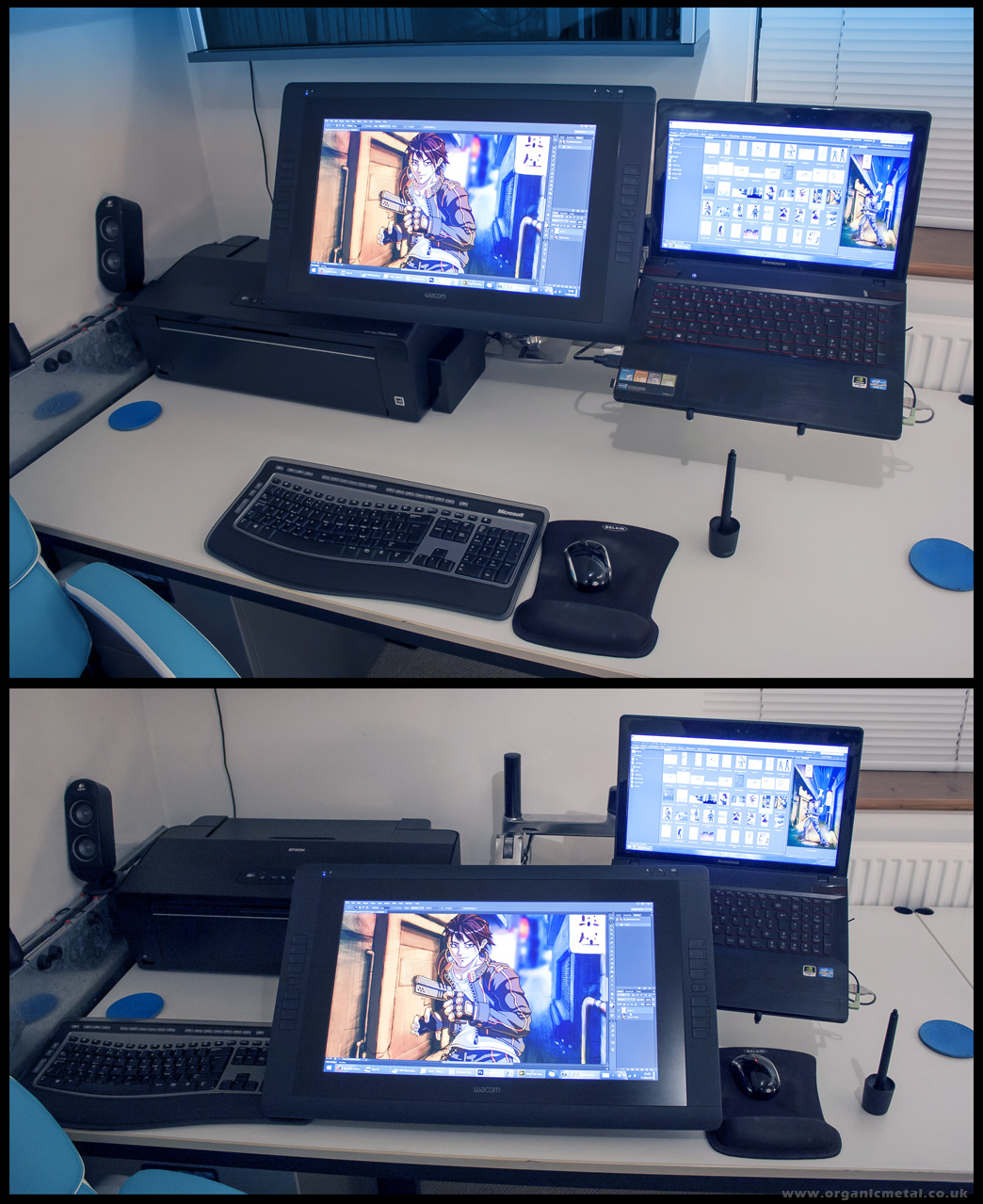
Here's my 2014 set up: Upgraded Lenovo Y500 Notebook PC running Photoshop CS6 + a Wacom Cintiq 22HD mounted onto Dual Ergotron LX Arms


The Cintiq 22HD

I've now used it to create three or four recent artworks over the last few months. It's working out well. I use the adjustable Ergotron Arm to have it in a floating, elevated position for day to day use and bring it down to the desk at around a 45 degree angle for art projects (see above). I decided to program the Cintiq buttons from top to bottom (for Photoshop use) as:

  • Step Forward
  • Step Backward
  • x (swap foreground and background colour)
  • b (brush tool)
  • Touch strip: mostly use for brush size
  • Ctl
  • Alt
  • Shift
  • Pan/ Hand tool

These would work great for me. The trouble is I often forget to use the the Cintiq's buttons as I'm so used to keyboard keys. And while, in theory, simply having to shift my right thumb to press the buttons would potentially simplify and speed up work flow, most projects still require me to use several other useful short cut keys so often neglecting the buttons and instead sticking exclusively to the keyboard seems to make sense right now.

The screen size is good. I didn't feel I needed the extra couple of inches from the 24" version, and the lower weight from the 22 incher means the adjustable arm I use doesn't have a problem keeping it suspended off the desk. It's not cutting edge screen tech, but gives a good quality result far greater than my previous monitor set up and I have no complaints. Also glad I didn't pay the extra for the touch version as I doubt I'd make use of those features.

At the moment the pen uses a standard nib, which I'll probably change to a felt nib as I like the added friction and softer tip feel. I'm still wondering if I need to get a 'Smudge-guard' glove to reduce palm friction. So far I've not really found this to be a problem so I'll stick without and see how I get on using it over the coming year.


The Set up

My keyboard [Microsoft Wireless 6000 v3.0] sits to my left (since I'm right handed) and it's pretty comfortable to use while I rest my palm on the desk/palm rest and my elbow on my chair's arm.

I've since extended the Ergotron laptop arm so the screens don't butt up against each other or need to overlap and there's enough space under the tech to clean and dust. All cabling is concealed within the arms themselves.

My printer [Epson 1500W Stylus Photo A3+] fits nicely at the back in the corner typically covered with a custom made cover to keep dust at bay.

My mouse [Microsoft Wireless Mobile 6000] sits on a gel filled mat, which saves me from RSI.

The Cintiq is connected to the laptop via a DVI to HDMI cable. This required opening up the back of the tablet to attach (twice, since I've since extended to cable length from 2m to 3m).

I also bought a Intuos Pen for when I take my laptop elsewhere and obviously the Cintiq has to stay at home. I've used it the Intuos once so far and liking it. I'd better start coming up with some new artworks so I can put this new tech to use.


Leave a Reply

Sign up to Newsletter
For art-related news, updates, a 15% discount on all art print orders PLUS be entered into a free bi-monthly prize-draw to win a mini art print!

This field is required.

Many thanks for subscribing!


FEATURED PRODUCTS
  • Medusa Sticker
    Medusa - 4 inch Vinyl Sticker
    £4.00
  • Anime Bowsette
    Bowsette Art Print - A3
    £17.99 – £27.99Price range: £17.99 through £27.99
  • Sale Product on sale
    Dio and the World - Men's
    T-SHIRT Dio and the World - Short Sleeve Tee
    £24.99 Original price was: £24.99.£19.99Current price is: £19.99.
  • Sale Product on sale
    Mens Junko Danganronpa Tshirt
    T-SHIRT Danganronpa - Short Sleeve Tee
    £24.99 Original price was: £24.99.£19.99Current price is: £19.99.
  • Japanese Geisha Wall Art Canvas
    Japanese Geisha Wall Art Canvas
    £24.99 – £599.99Price range: £24.99 through £599.99
  • World War Skull Art
    World War Skull Wall Art Canvas
    £24.99 – £599.99Price range: £24.99 through £599.99


BLOG ARCHIVES

RSS Feed RSS – Posts

RSS Feed RSS – Comments


Return to blog start...