Ben Krefta — Home
  • HOME
  • SHOP
    • SHOP ITEMS
    • CART
    • CHECKOUT
  • PORTFOLIO
    • GALLERY
    • SLIDE SHOW
    • PROJECTS
  • BLOG
  • TOTAL BLAST GAME
  • ABOUT
    • PROFILE
    • BACKSTORY
    • WORKFLOW
    • NEWSLETTER
  • HIRE ME
  • CONTACT
Art, designs, illustrations, text and content © 2026 BenKrefta.Com

Art Questions and Answers #9

by Ben December 23, 2020 in Art Talk 1 comments tags: #arttalk, digital art, q and a

art q and a 9


What digital drawing software would you recommend for a beginner, other than Adobe Photoshop?

I can’t say I have a great answer for this one since it’s been years since I used anything other than Photoshop. I guess the reason for using something other that Photoshop would be to save money. Or find something that suits you better- whether it be simpler and easier to use or more relevant to creating the type of art you produce. I used to like Paint tool Sai, Painter and Clip Studio Paint  (was known as 'Manga Studio' back in the day when I used it). Krita should do the job if you don’t want to pay any money.

It's also worth looking into tablet based drawing apps which tend to be easier to learn with limited functionality. Autodesk Sketchbook, ArtRage and Procreate are spoken of highly within the artistic community. Although I've personally never tried them - I don't have an Ipad or Tablet computer.

The best thing would be to try all of the above and see which one suits you. Most Apps will provide at least a 30 day free trial if they're not already free. How about setting yourself a project to create an artwork with each piece of software? This would allow you enough time to evaluate it's pros and cons before making a decision about which to use on a regular basis.


What challenges do you often come across when creating your drawings? (software difficulties, time limits)?

Every single artwork usually has at least one challenge. The level of difficulty and challenge often depends on exactly what I’m creating and how complex it is.

Since I’ve been using digital software for so many years, I don’t usually get stuck with the software. Unless there’s some unusual conflict with my operating system, graphics driver or graphics tablet. Occasionally a new software update can set me back if there’s a new tool or process to learn.

Time is often an issue for me due to the fact I typically create artwork with an art style that has a high level of finish; so lots of smooth blending and attention to detail. This is generally more time consuming to create opposed to looser, sketchier or painterly styles. I've found that I work quite slowly in general- perhaps a trait or my perfectionist nature? So I've had to accept this is a fact and take it into consideration when sit down to create anything. Also over time I've learned when it's time to quit fiddling around with a piece of art and consider it finished. Sometimes setting yourself a deadline is enough to help determine when a piece of artwork can be considered finished.


I will be creating an original character of myself, what tips would you recommend for getting the right proportions and features of my character?

For proportions, stick to real life reference to start with. Then consider ways you can tweak your style to make it more ‘manga’ or whatever it is you want to go for. It might be worth taking photos of yourself at different angles and in different poses and sketching them in order to work with a base which you can then tweak and overlay with costume and accessories.


When creating a character and a background, would it be best for both to be detailed, or only one of them to keep the focus on one feature?

If the brief / objective is to create a character for example, concept art character designing, then focus entirely on the character. Sure, you can add background elements to give some context, but it’s not necessary to go too detailed unless you are deliberately illustrating a scene.


Do you have any other tips or recommendations on digital drawing or creating an original character?

Before even picking up a pencil, it’s worth writing down 3-6 themes or elements you want to include in the character. Ask yourself- What’s their gender? What genre/s are you designing for? What part of the world are they from? What’s their job/role? What kind of abilities do they have? What tools do they use to help with their duties? What type of clothing would make their job easier? For example:

Gender: Male

Genre: Medieval fantasy

From: The Mountains

Role: Hunter

Abilities: Strength, tactics and cunning

Tools: Bow and Arrow, Axe

Clothing: Something to keep him warm in the mountains and camouflaged and protected when hunting


Once you’ve figured out these questions, think of a feature that makes them special and stand out from every other generic hunter character. Maybe he’s got a crazy scars from battle, or a huge, magical bow that fires 20 arrows at once?

Also consider what wouldn’t work with this character. For example, a metal arm wouldn’t help if you’re in cold environments. Loud and colourful clothing wouldn’t help sneak up on your prey. It’s about creating something over the top and fun, but whilst still being somewhat believable. I touch on this question in both The Artists Guide to Drawing Manga and Digital Manga also.


~~~

If there's a question you'd like answered relating to art, or digital illustration, feel free to contact me or leave a comment.

Leave a Reply

What Equipment do you use for Digital Art?

by Ben July 12, 2019 in Art Talk 0 comments tags: #arttalk, digital art

Working on a Wacom


Which tool will make me suddenly become an amazing artist?

One of the most common questions I've been asked over the years relating to art and design are ; "what tools do you use?", "what software do you use?" or "what equipment do I need?

There's load of amazing tools, Apps and hardware out there which can improve your ability to create art. But before I discuss what I use, it's worth noting that there is no one tool that'll make your work look significantly better. Particularly if you're just starting out on your artistic journey. I'm sure a lot of beginners think, "if I just had the correct piece of software I'd be creating art like my favourite artists!". In my teenage years I certainly believed this might be the case. I later realised that being a good artist requires knowing how to create something. Acquiring skills and knowledge about art and design are the first things an artist must do in order to create good looking artwork. No tool or particular piece of software will ever significantly improve your artwork.

I know this is not what people want to hear. To have to devote hundreds if not thousands of hours to art before seeing significant improvements can be annoying, overwhelming and off-putting. But this is something all good artists must endure (but ideally enjoy!).

As a side note- software and Apps have come a long way over the decades. It is indeed possible to convert existing images or photos through a single-press digital filter to create something totally unique and somewhat artistic-looking. Whether or not these kind of derivative images could be considered 'art' is up for debate. Although it's true to say chucking a filter over the top of a image taken from a Google search is at least lazy, uncreative and limited.


A bad workman always blames his tools?

Do you look at your work and think it sucks? Not satisfied with the software you use? Your problem might not be anything to do with the tools you use. It's fair to to say that if you're at a level whereby you feel somewhat clueless how to, for example; go about proportioning characters, drawing clothing, folds or choosing how to shade and colour your designs, then I'd recommend ditching the computer altogether. Instead start spending most of your time with a pencil and paper. Once you're making progress with traditional media and able to create some decent work, sure- try going down the digital route.

To answer the question "what tools do I use?": For digital work, I use a Laptop PC, Wacom Cintiq Graphic Tablet and Adobe Photoshop CC.
Is this what you need? Not at all- If you want to, for example, work on a Mac with a Huion tablet and Clip Studio Paint as your software of choice, there's nothing wrong with that. It's possible to create virtually all the same content with most combinations of any modern hardware and dedicated art software available.


Stick with what you know

Part of the reason I use PC, Wacom and PS is due to habit and what I'm familiar with. You might ask the question, 'why stick with what you know?' and sure, I'm always open to the possibilities of new equipment being able to improve my workflow. But, the familiar can be your friend. I know how to diagnose and resolve potential computer crashes on a PC, I know where all the tools are in Photoshop and Wacom has always provided decent tablets which so far haven't let me down.

When I was younger I wanted a job as a graphic designer. In the graphic design industry Macs are (or at least were) the norm, so I went to University, in part, to get to grips with the hardware and software which the industry was seemingly demanding. While it wasn't a massive hardship to understand the differences and quirks between a Mac and PC, there was a still learning curve which I now feel wasn't necessary to tackle. Particularly as a freelancer artist, my clients are only concerned with the finished results and files they can open and content they can view. So long as it looks good, no one cares what you use to create it and so my new-found Mac skills are kind of redundant.

Like I say, whatever you're familiar with should be top priority. The more used to it you are, the quicker and smoother your experience of creating art and designs will be. Without wanting to go into a Mac vs PC debate, a PC (in my case, Laptop) has some definite advantages. The main one being the fact it's cheaper so I can afford a higher spec machine or update and upgrade components more often. Also where I'm located we have 4 or 5 power cuts/ outages every year so having a laptop with battery avoids a sudden loss of work. The portability of my laptop means I can take it to and from a place of work.

Why I do I choose Photoshop? I discuss hardware and the advantages Photohop and the advantaged of digital in-depth in my book Digital Manga. If you're a beginner to intermediate artist who'd like a good grasp of Photoshop in relation to character creation and colouring, I'd recommend buying a copy- I don't know of a better resource.


Hardware Tech / Spec Summary:

To be more specific about what equipment I'm using as of 2019 (and for the tech nerds out there):

  • Gaming Laptop: MSI Prestige PE70 7RD-221UK 17.3" 1080p:
  • CPU: i7-7700HQ @ 2.8GHz
  • Memory (RAM): 32GB DDR4 @ 2666MHz (G-Skill Ripjaws)
  • Graphics: Geforce GT 1050 Graphics 2GB (GDDR5)
  • Hard Drive 1: (For OS) 250GB SSD: Samsung 960 EVO 250GB M.2-2280 (Increased speed over default 128GB by 4.7x)
  • Hard Drive 2: (For Data) 2TB Seagate HD
  • Hard Drive 3: An external 5TB back up and overflow drive.
  • Operating system: Windows 10 
  • Graphics Tablet: Wacom Cintiq 27QHD Touch 
  • Tablet and Laptop Stand: Ergotron LX Arms x3
  • Additional Monitor: (For reference images) LG IPS 21"
  • Scanner: Plustek OpticPro A320 Flatbed A3 Scanner
  • Printer: Epson Stylus 1500W A3+ Deskjet printer
  • Mouse: Microsoft Wireless Mobile 5000
  • Additional Keyboard: Microsoft Microsoft Comfort 5050
  • Speakers: Logitech 2.1
  • Additional Web Cam: Microsoft LifeCam HD-3000 and mounted Microphone is a Samson C01U
  • Chair: Steelcase Black Leather
  • Screen Colour Calibrator: Spyder 5 Elite
  • Extras: 90x40cm Custom Mouse Mat to rest tablet on + Gel wrist mouse mat to avoid RSI. Blue-light screen glasses from Prospek.
  • Also, see my Post: My Work space / Desktop Area for my previous Tech / Spec List


Cost-wise, this is all reasonably expensive kit which I've accumulated over the years. As a beginner to digital art I definitely wouldn't recommend spending thousands of pounds on a similar set up and instead look for entry-level equipment or whatever you can afford. If I really wanted to, I could upgrade a lot of my equipment but I couldn't justify the expense. I'd likely need to spend 3-4x what I had paid to get for my current set-up to get, perhaps a 10-25% increase on performance. It's just not worth it. I'll likely stick with what I've got for the next few years. I'm pretty satisfied with it all for the most part.

If anyone wants a non-bias opinion on any aspect of the above tech or set-up, leave a message and I’ll add a follow-up comment 🙂

Leave a Reply

Creating some Fresh Dirty Art!

by Ben August 18, 2017 in Art 0 comments tags: afro, art, artwork, digital art, work process

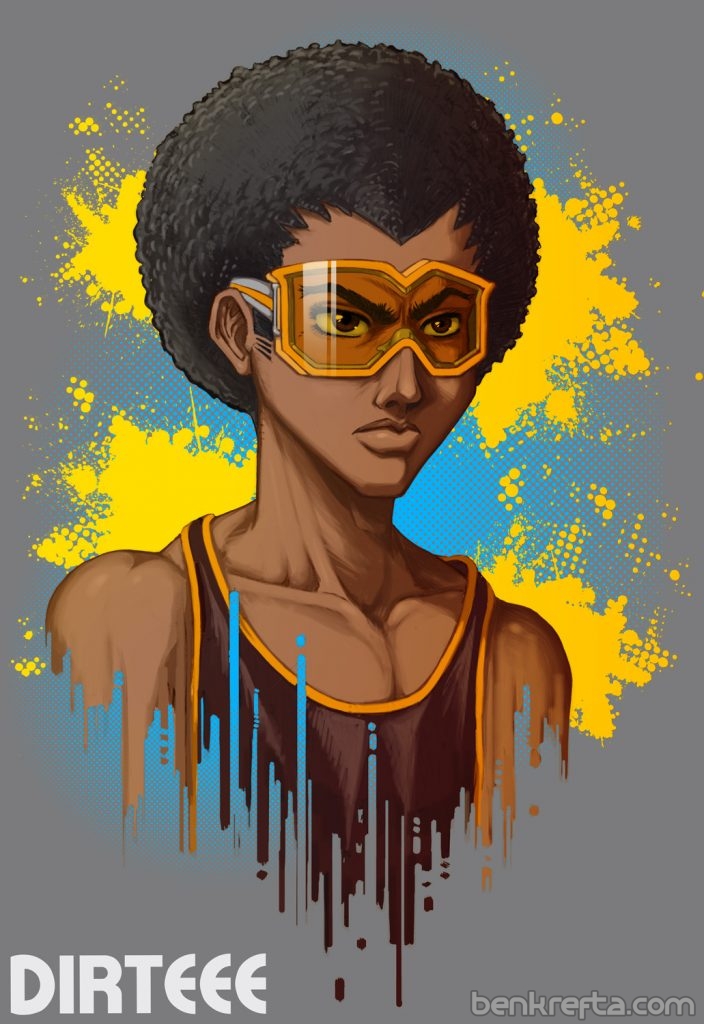
This one was a commission of hip-hop mascot 'Dirteee'. Although pretty basic, I had an original reference design to work from, and the brief was basically to draw it in my own style. I like to mix my style up a lot- drawing semi-realistic comic characters one week, tattoo art the next, then going back to my manga roots after that. And even within the manga sub-genre, I vary styles from time to time :)

As always, starting with a sketch and then moving on to colours once the client approves the design:

[gallery size="medium" type="square" ids="3352,3353,3354"]

[caption id="attachment_3351" align="aligncenter" width="704"]Dirteee Hip-Hop Artwork Final Result[/caption]

If you'd be interested in commissioning me to create artwork of your character, a portrait, mascot etc, leave a message or contact me and I'll get back to you as soon as I can.

Leave a Reply

Sign up to Newsletter
For art-related news, updates, a 15% discount on all art print orders PLUS be entered into a free bi-monthly prize-draw to win a mini art print!

This field is required.

Many thanks for subscribing!


FEATURED PRODUCTS
  • Medusa Sticker
    Medusa - 4 inch Vinyl Sticker
    £4.00
  • Anime Bowsette
    Bowsette Art Print - A3
    £17.99 – £27.99Price range: £17.99 through £27.99
  • Sale Product on sale
    Dio and the World - Men's
    T-SHIRT Dio and the World - Short Sleeve Tee
    £24.99 Original price was: £24.99.£19.99Current price is: £19.99.
  • Sale Product on sale
    Mens Junko Danganronpa Tshirt
    T-SHIRT Danganronpa - Short Sleeve Tee
    £24.99 Original price was: £24.99.£19.99Current price is: £19.99.
  • Japanese Geisha Wall Art Canvas
    Japanese Geisha Wall Art Canvas
    £24.99 – £599.99Price range: £24.99 through £599.99
  • World War Skull Art
    World War Skull Wall Art Canvas
    £24.99 – £599.99Price range: £24.99 through £599.99


BLOG ARCHIVES

RSS Feed RSS – Posts

RSS Feed RSS – Comments


Return to Blog Home...